
Code Editor Popup
A real code editor for plain text fields on classic ServiceNow forms. Syntax highlighting, formatting and SQL safety checks, switched on per field with one dictionary attribute.
What It Does
SQL queries, JSON, scripts or HTML often live in plain multi-line text fields. Editing them in a bare textarea means no highlighting, no indentation and no help when something is wrong.
Code Editor Popup adds a small Edit SQL or Edit code button below every field you choose. It opens a popup with CodeMirror 6, the editor behind many modern browser IDEs. Take over writes the text back into the field, the form is saved as usual.
- Configured, not coded: add
code_editor=sql:tsqlto the dictionary attributes of a field. One global script finds every configured field on any table. - Languages: SQL with dialects (T-SQL / SQL Server by default, MySQL, MariaDB, PostgreSQL, Oracle PL/SQL, SQLite, standard SQL), JavaScript, TypeScript, JSON, HTML, XML, CSS and Java.
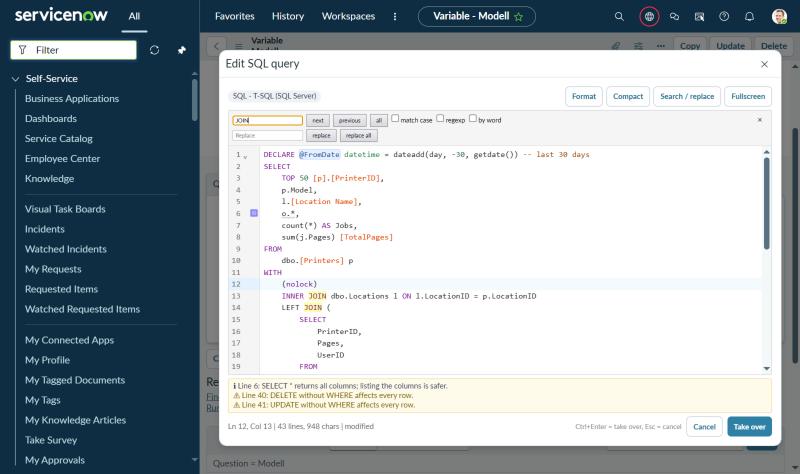
- Editor comfort: line numbers, auto-indent, bracket matching, code folding, search and replace, multiple cursors, undo, fullscreen.
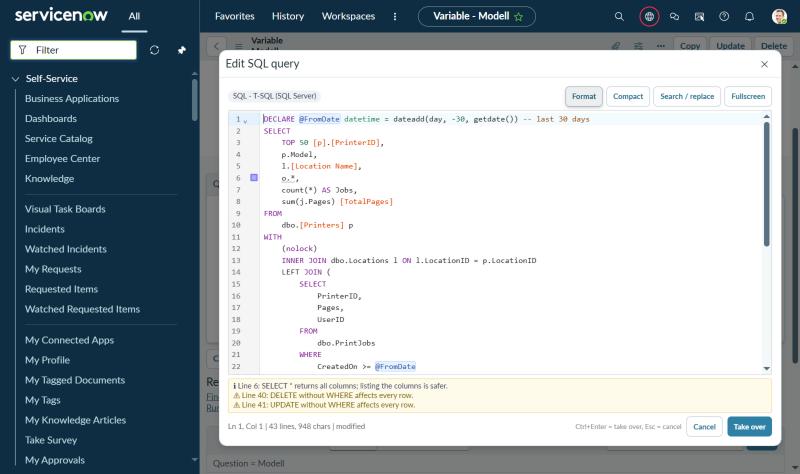
- Format and Compact: dialect-aware SQL formatting, beautifier for JavaScript, HTML, CSS and XML, pretty JSON. Compact puts a SQL statement on one line.
- SQL safety checks: warnings for
DELETEorUPDATEwithoutWHERE,DROP,TRUNCATEandSELECT *. Click a warning to jump to the line. - Placeholders stand out:
${var},@param,:paramand?are highlighted. - Read-only aware: read-only fields open in a view mode without Take over.
- Keyboard first:
Ctrl+Entertakes the text over,Esccancels.
Everything runs on the instance. CodeMirror 6, sql-formatter and js-beautify (all MIT licensed) are bundled once and stored as UI Scripts, so nothing is loaded from a CDN. That keeps it working in locked-down customer instances. In the global scope: one client script, one script include, one UI page and four UI scripts.
Free to use. You are welcome to use and adapt this tool in your own projects. It is shared as is, without warranty or support, so please try it on a sub-production instance first. Using it is at your own risk.
A Closer Look
Click a screenshot to open it at full size.
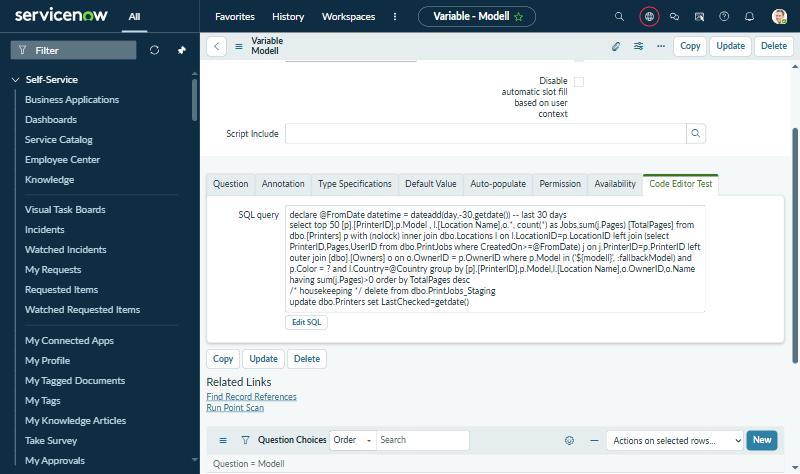
code_editor attribute gets its own Edit button.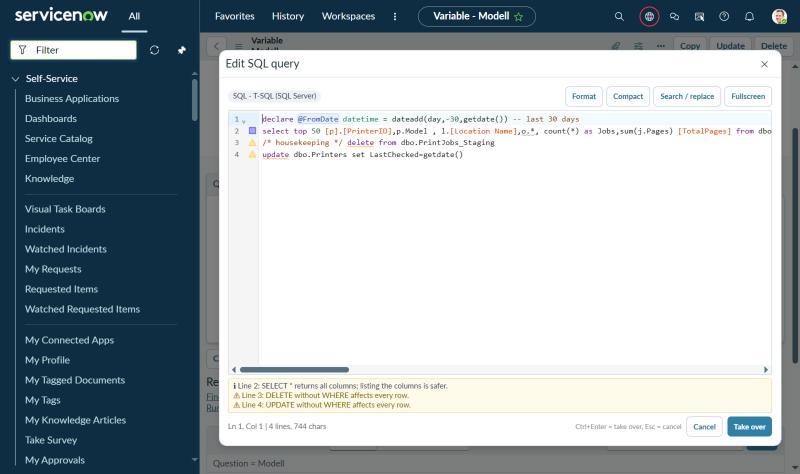
Live Demo
The same editor as on the instance, running right here in your browser. Nothing is sent anywhere.
The first click loads about 1.8 MB of JavaScript. Try Format, Ctrl+F and Ctrl+Enter.
Getting Started
- Download the update set XML below.
- In your instance, open System Update Sets > Retrieved Update Sets and choose Import Update Set from XML.
- Open the imported update set "Code Editor Popup", preview it and commit it.
- Add
code_editor=sql:tsql(orjson,javascript,html, …) to the attributes of a multi-line text field in its dictionary entry. - Open a record of that table in the classic UI: the Edit button is below the field.
Download Code Editor Popup
One update set with seven records (client script, script include, UI page and four UI scripts), global scope, about 2 MB including the bundled libraries.
Download Update Set (XML)Classic UI16 forms only. Free to use, at your own risk. Please install it on a sub-production instance first. Bundled libraries: CodeMirror 6, sql-formatter and js-beautify, all under the MIT licence.
Questions about this tool? Contact Markus.